Newer
Older

This service is an **OSL controller** which acts as a **CAPIF 3GPP API Invoker Management layer**. In a nutshell it:
- Registers and manages multiple CAPIF invokers each one registered as Resource Specification in OSL Resource Specification catalog under category invoker.capif.osl.etsi.org.
- Talks to a CAPIF Core component (e.g. https://capifcore.org:443)
- Uses ActiveMQ for internal messaging (e.g., TMF catalog operations, orchestration invocations, etc)
- Can automatically onboard Invokers, and manage certificates (via public/private keys)
When a request of a new Invoker resource is performed (via a Service Order from OpenSlice), an Invoker is automatically registered to CAPIF core services and provides back a Bearer AUTH TOKEN as well as all the discovered API services as Service characteristics, so they can be used subsequently by further invocation to the registered service.
For example, it is possible during an orchestration to onboard automatically an Invoker and perform an API call to a CAPIF registered service provider.
Moreover, OSL invokers, once onboarded perform periodic token refreshes.
 Before launching the service, invokers need to be configured via Springboot environment variables, overriding the default application.yaml behavior.

-   Loads invoker definitions (name, keys, description, APIs) from `application.yml` into the `SpringCapifInvokersConfig` bean using Spring’s `@ConfigurationProperties`.

-   This allows external configuration of multiple API Invokers.
Currently application.yaml onboards two example invokers with self-signed certificates. In general the
 section in `application.yaml` configures the Spring Boot application  to:
- Register as an API Invoker with a CAPIF Core
- Use secure credentials (optional keys)
- Periodically refresh tokens
- Discover available APIs
- Define which invokers to onboard
-   Authenticates with the CAPIF Core (`/getauth`) and if successful then

-   Creates a *TMF ResourceSpecification* **per Invoker** (via `CapifInvokerResource`), storing bearer tokens, API names, status, etc.
### 🤝 **3. Invoker Lifecycle Management (`InvokerManagement`)**
-   Creates self-signed or PEM-based keys if needed.

-   Generates CSR and onboards the Invoker to CAPIF.

-   Discovers available APIs and matches them with the configured ones.

-   Sets up OAuth2 security context and bearer token.

-   Stores onboarded state internally and updates the corresponding TMF Resource.
### 📡 **4. Communication with CAPIF Core (`CapifService`)**
-   Handles:

    -   Auth and token exchange

    -   Invoker onboarding (`/api-invoker-management/...`)

    -   API discovery (`/service-apis/...`)

    -   Bearer token retrieval (`/capif-security/...`)

-   Supports TLS and optional mTLS using truststore or inline PEM certs.
-   All invoker state is reflected into TMF Logical Resources using the `CatalogClient`.

-   Uses ActiveMQ/JMS to integrate with the rest of the OSL system (create/update/delete resource specs).
-   Periodically refreshes:

    -   Auth tokens (`authorizeToCapifService`)

    -   Bearer tokens per invoker (`processBearerRefreshTokens`)
106
107
108
109
110
111
112
113
114
115
116
117
118
119
120
121
122
123
124
125
126
127
128
129
130
131
132
133
134
135
136
137
138
139
140
141
142
143
144
145
146
147
148
149
150
151
152
153
154
155
156
157
158
159
160
161
162
163
164
165
166
167
168
169
170
171
172
173
174
175
176
177
178
179
180
181
182
183
184
185
186
187
188
189
190
191
192
193
194
195
196
197
198
199
200
201
202
203
204
205
206
207
208
209
210
211
212
213
214
215
216
217
218
219
220
221
222
223
224
225
226
227
228
229
230
231
232
233
234
235
236
237
238
239
240
241
Let's analyze the `capif:` section in application.yaml :
**CAPIF Registration Endpoint**
Used to authorize the app to the Capif Service, get an auth access_token and a certificate (ca_root)
REGISTER_HOSTNAME: localhost
REGISTER_PORT: 8084
USER_NAME: custom_user
USER_PASSWORD: user_pass
**CAPIF Core Connection Details**
Where the CAPIF Core (the registry/service broker) lives. Our app will send API calls like onboarding and discovery here.
CAPIF_HOSTNAME: capifcore
CAPIF_PORT: 443
**CAPIF API Paths**
ONBOARDING_URL: api-provider-management/v1/registrations
ONBOARDING_URL_INVOKER: api-invoker-management/v1/onboardedInvokers
DISCOVER_URL: service-apis/v1/allServiceAPIs
These are the REST endpoints for:
- Registering our own invokers
- Discovering available service APIs
> The app authorizes to the CAPI core service with the accessToken got
> by the previous endpoint This follows the CAPIF spec for common API
> exposure (3GPP TS 29.222 / 33.122).
**Security Settings**
ALLOW_INSECURE: true
TRUSTSTORE_PATH: none
TRUSTSTORE_PASSWORD: none
ALLOW_INSECURE: true disables strict TLS cert validation (dev/testing mode).
If you want mutual TLS (mTLS), you'd set:
- A real TRUSTSTORE_PATH
- A truststore password
- Turn ALLOW_INSECURE to false
**Token Refresh Intervals**
authRefreshTokensPeriod: 36000
processBearerRefreshTokenPeriod: 180000
- authRefreshTokensPeriod: how often (ms) to refresh CAPIF access tokens.
- processBearerRefreshTokenPeriod: how often bearer tokens are refreshed and checked.
This ensures long-running services don’t expire.
Configured Invokers
invokers:
- name: exampleInvoker
description: an example invoker
privatekey: selfsign
publickey: selfsign
apinames:
- api: hello_api_demo
Each `invoker` block represents an **API Invoker you want to onboard** to CAPIF.
There are two types shown:
There are two types shown:
#### 🧪 Simple test entries
privatekey: selfsign
publickey: selfsign
Used when your app will auto-generate keys or use placeholders.
#### 🔐 PEM Key-based Invoker
privatekey: |
-----BEGIN PRIVATE KEY-----
...
publickey: "-----BEGIN PUBLIC KEY-----..."
This allows using **real asymmetric keys**, which CAPIF uses for identity and authentication.
Each invoker:
- Has a `name`, `description`, and optional `invokerversion`
- Registers for specific APIs like `hello_api_demo`
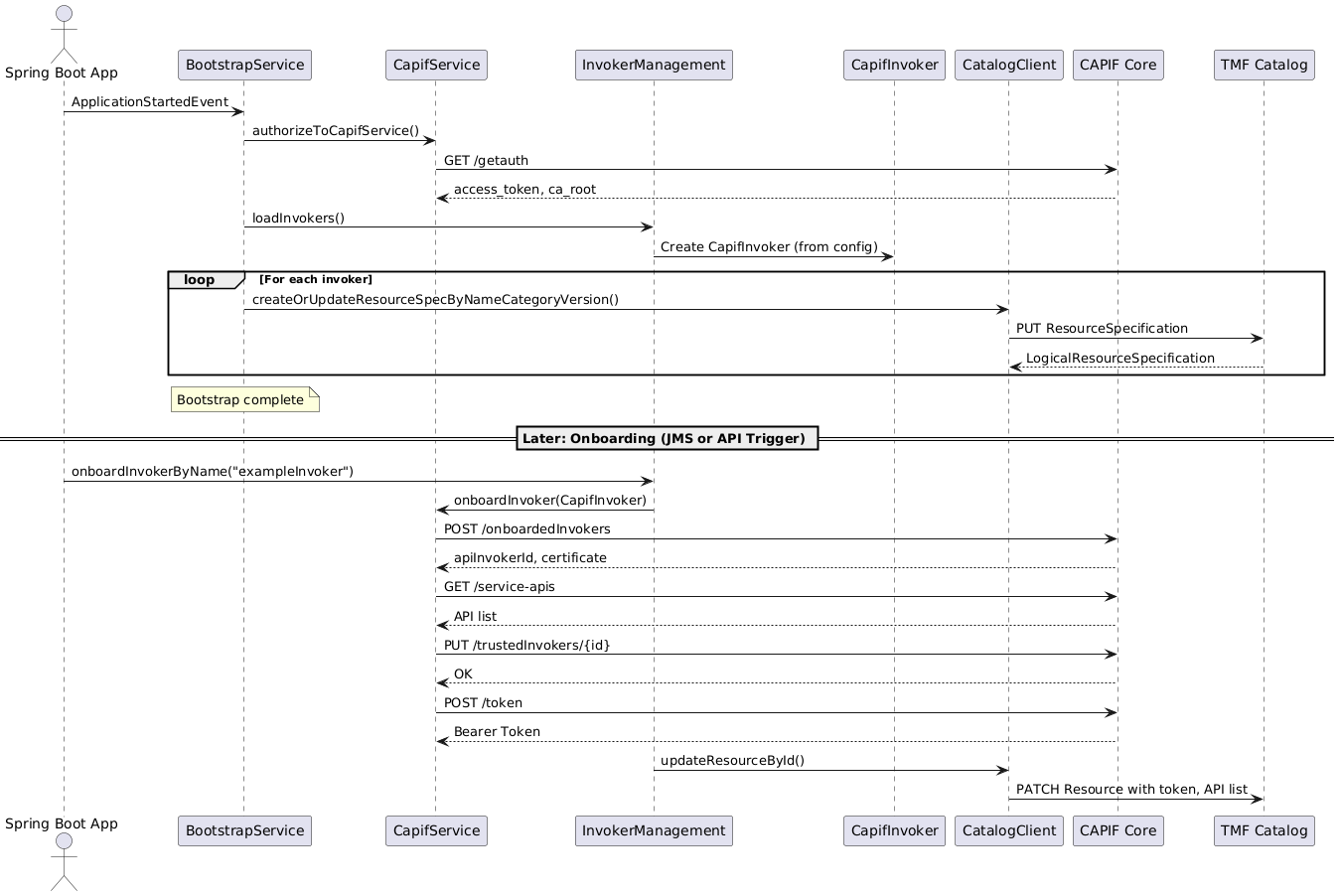
here is a simple diagram of performed actions:
## 📤 **Using the OSL CAPIF invoker service**
From the above example configuration, we will get registered in our OSL Resource Specification catalog two invokers: exampleInvoker and exampleInvoker2.
Use them as Resource Specification(s) assigned in a Resource Facing Service.
### 📦 **Resource Specification Characteristics**
| Name | Value Source | Description |
|--|--|--|
|`bearerAccessToken` | Token from CAPIF | OAuth bearer token assigned to Invoker |
| `reqApiNames_0`, `reqApiNames_1`, ... | From `invoker.apinames` list | Requested CAPIF APIs |
| `status.discoveredServiceAPIs` | CAPIF API discovery result (JSON) | APIs discovered from CAPIF Core |
| `status.state` | Invoker state enum (e.g., CONFIGURED) | Current CAPIF onboarding status |
| `status.infoMessage` | String (e.g., error or health status) | Any message for the user/operator |
----------
### ✨ Notes
- These characteristics follow the TMF Open API model (e.g. `ResourceSpecificationCharacteristic` and `ResourceSpecificationCharacteristicValue`).
- All characteristics are set as **non-configurable** (`configurable: false`).
- Value types are all **TEXT**.
The above Resource Specification Characteristics will be also exposed as Service Specification Characteristics.
Then you can insert this Resource Facing Service Specification as a related Service Specification in a Customer Facing Service Specification.
Here is an example rule that will get the latest Bearer and perform an API invocation (POST in this example) to an API provider register in the CAPIF server.

The result will be stored in another characteristic called `myresponse`